






- Information Technology
If there is this smart lock on the door of the house, the thief cannot enter the house
- Information Technology
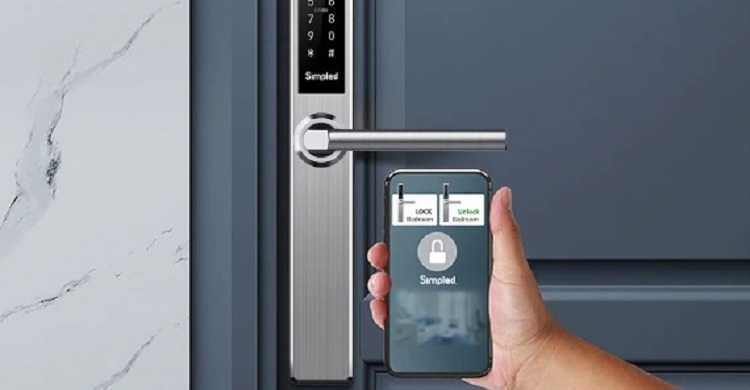
Information technology desk: Smart lock has come to the security of homes, offices and courts. Which is basically a digital lock. This lock is so advanced that it won't work without a password, fingerprint or Face ID. That is, if there is a lock on the door, the thief cannot break the lock and enter the house.
Like a smartphone, this smart lock will also be connected through the home or office Wi-Fi network. This lock can be opened and closed through a specific app from the smartphone. Whether someone is trying to open the smart lock illegally or not, you will also be able to sense it remotely through the smartphone. As a result, it is not possible for someone to unlock the house or office by breaking the lock or making a duplicate key by stealing the fingerprint of the key. There are also new features.
For example, other members of the household can open and close the lock from their smartphones. You can arrange fingerprint and number-password of a few known people to secure that lock. If you put a smart lock at home or office once, it means it is secure, that's for sure! There is no need to make different locks for everyone in the house. If you don't leave the house with the key or if you lose the key, there is no risk of danger. All round protection is guaranteed.
Is that true? Once a smart lock is installed, it means that it is an impenetrable fortress, is it possible to say? Experts say, not at all. Rather, some rules must be followed to keep the smart lock secure. Otherwise, your smart lock may become even unsmart than the old lock.
Why smart lock is not the ultimate protection?
Cyber experts say that since a home or office smart lock, like your smartphone, works over a WiFi connection, and WiFi networks can be hacked, so can your smart lock. For that, the first thing you need to do is secure your WiFi network. The password of the router through which you are using the WiFi network needs to be kept secure. Use complex passwords (combining small and capital letters, signs, numbers) Your service provider first sets the password when you set up a WiFi connection. Change that password first. And that password should be changed at regular intervals.
After that, you have to change the password of the smart lock you are buying or installing and feed it to your own or other family members' smartphones, so that you don't have any problem opening the smart lock. It should be checked whether the encryption of the smart lock is correct or not. Another important thing is the security of your or your family members' smartphone.
Because, the entire operation of the smart lock will be controlled through the smartphone. So use passwords and two-factor authentication on smartphones. Even if the smartphone is somehow lost, no one else can use it to open the office or home smart lock. Keep in mind, how secure a smart lock is depends on how you use it. Then, no tension.
Comments (0)

Government is committed to building a citizen-friendly di...
1
News Desk: Fakir Mahbub Anam, the Minister for Post, Telecommunications, and...

Today is World Telecommunication Day
2
News Desk: World Telecommunication and Information Society D...

What is 'Glue Gun'? With which broken bones will be joined
3
News Desk : In the future, plasters, metal screws or complicated surgeri...

There is a global discussion on Internet policy
4
Information Technology Desk: The Internet Corporation for Assigned Na...
ChatGPT-Gemini falls into the trap of fake information
5
Information Technology Desk: Artificial intelligence or AI is becoming the main means of searc...



মন্তব্য (0)